

FlipClips Universal Band Installation
Band installation guide.
Universal FlipClips™
Band Installation
This band installation guide will go over setup of your slingshot and knowledge to make sure you safely and correctly use your SimpleShot Scout LT or Hammer XT slingshot. Both use universal FlipClips which do not have a left and right component.
Shown on the Scout LT, but the process is the same for Hammer XT heads.
This is the SimpleShot Guide to installing slingshot bands using our FlipClipsX on the Scout LT Slingshot or Hammer XT heads. This is a similar process for any other FlipClipX Slingshot models – made to accommodate both OTT (Over The Top) and TTF (Through The Forks) shooting style configurations. Both Scout LT and Hammer XT are great for manually tying the bands on, but we recommend only using the SimpleShot FlipClips that came with your slingshot to secure your bands for best results.
The FlipClip band attachment method is one of the simplest slingshot banding process since the FlipClip can be tightened and loosened without removing them from your slingshot frame. Simply loosen up the clip where the installation will be taking place. Make sure that you have enough room to insert the end of the band. Insure that the inside of the pouch is facing up as you place the band in the grove, creating a trough back from the target side of the slingshot, knowing that it will pull over the top of the forks. Once your bands are in place, tighten up the clip finger tight – and finger tight is just fine, you do not need to over tighten because you can damage the bands if you get too tight. Make sure your FlipClips are snug and that your bands have no twists for a proper over-the-top or through-the-forks band configuration with SimpleShot FlipClips and your slingshot.
For added performance, tune your bands by cutting them to match your draw length. If you don't know how to tune your bands, please check out our tutorial on our website or youtube to make sure your bands are tuned properly.
This page shows info on the Scout LT. For more info on the Hammer XT FlipClips installation, click here.
- * *
Get to know your Scout LT™ Slingshot
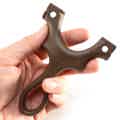
The Shooter Side
This is the side of the Scout LT that will face you as you shoot.
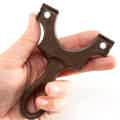
The Target Side
This is the side of the Scout LT that will face the target as you shoot.
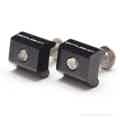
FlipClipsX for Scout LT
The FlipClips hold the bandset in OTT or TTF configuration. No swapping left and right.

OTT (Over The Top)
Band orientation where you shoot the ammo over the top of the forks. (FlipClips hold the band to the TOP of the frame.)
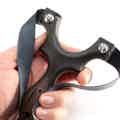
TTF (Through The Forks)
Band orientation where you shoot the ammo through the forks. (FlipClips hold the band to the SIDE of the frame.)
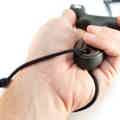
The Lanyard
A simple piece of paracord that attaches to the handle of your Scout LT frame and secures the slingshot to your frame-holding hand.
Get to know FlipClipsX™ for your Scout LT™
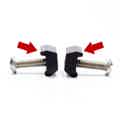
Every FlipClip has a "tooth."
This upper side of the clip is slightly larger and less round. Only use this side to grip the band.
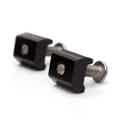
FlipClip X for Scout LT are interchangeable.
The logos goes toward the band. But there's no left or right component for LT!
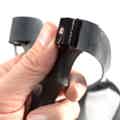
For TTF configuration:
The logos should be on the SIDE with the bands around the sides.
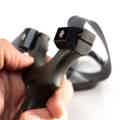
For OTT configuration:
The logos should be on the TOP with the bands over the top.
- * *
Install your FlipClipsX™
First, decide whether you will be installing your bands OTT or TTF.
_Don't know which to use? Try both, starting with OTT. Remember, the clips are interchangeable for the Scout LT™._
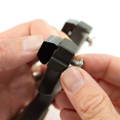
Step 1.
Place FlipClip with logos facing OUT for TTF and UP for OTT.
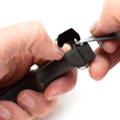
Step 2.
Place the band into the groove of the frame and under the "tooth" of the FlipClip.
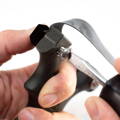
Step 3A.
Tighten the fastener until hand tight. (Shown OTT tightened with screwdriver).
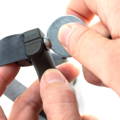
Step 3B.
****
Same for TTF. Here it's shown using a large washer. Use a coin or the back of your knife as well.
In step 3A & 3B, No need to tighten very hard.Be careful to not damage the band material as tighten your FlipClips.
Important Scout Instructions

The screw heads must go on the shooter side, NOT the target side! The Clips will be on the target side with the bands wrapping around the frame.

Check your bands before every use. Give them a good stretch BEFORE you bring the slingshot up into shooting posture.
****
****
- * *
And now, watch the video to see it in action!
Sale Off

Scout LT2
$44.99$38.24
Add To Cart
Sale Off

Scout LT2 G10
$119.99
Sold Out
Sale Off

Scout LT2 PRO
$119.99
Sold Out

Starter Kit – Scout LT2
$69.99$59.49
Add To Cart

Scout LT2 Scales & Clips Bundle
$13.49$11.46
Add To Cart

Custom-Cut Slingshot Grips
$14.99$12.74
Frequently Asked Questions
Does the Scout LT come with everything I need to shoot?
Absolutely. It comes with a lanyard, two powerful bandsets, and a pair of FlipClipsX to attach them to the frame. Everything you need to shoot is included. You supply the ammo.